How Does Home Solar Installation Work?

How Does Home Solar Installation Work?

A rooftop with solar panels under a bright blue sky and green hills in the background.

A lot of homeowners sit on the solar decision for months. The process just feels unclear.

Will workers be in your home for days? Who handles the permits? What happens between signing a contract and the day your system can be turned on? And is the cost really worth it?

These are fair questions. Residential home solar installation follows a clear, predictable process, and most Sonoma County homeowners find it far less disruptive than they expected. Here’s what it looks like, step by step.

Key Takeaways

  • Physical installation takes 1 to 2 days for most homes
  • Permits, utility applications, and inspections are all handled by your installer

Step 1: Free in-person consultation

We like to start any solar project with a one-on-one conversation to learn more about your needs, your home, and your expectations.

At Synergy Solar, owner Mike Pane personally contacts every new customer. He asks about your PG&E usage history, any upcoming changes to your home or energy needs, and what you’re hoping solar will do for you.

From there, we’ll schedule a free on-site visit. We inspect your roof, review your main electrical panel, and assess where a battery would fit best.

In Sonoma County, local fire access setbacks, HOA rules, and varied roof types, all shape how a system gets designed. That detail requires a real site visit.

Step 2: Your custom system proposal

After the site visit, you’ll receive a detailed proposal built around your home and your energy usage.

It includes:

  • System size and layout based on your utility data
  • Financial breakdown with current applicable incentives
  • ROI analysis tied to your real PG&E bills and future energy usage changes
  • Battery storage options

Synergy tracks the full incentive landscape and applies what’s relevant to your project.

If solar doesn’t make financial sense for your property, Synergy will say so.

Step 3: Permits and paperwork

Permit applications, electrical drawings, utility interconnection filings; it all sounds complicated. The good news?

You don’t have to manage any of it.

Synergy handles everything in-house:

  • All electrical drawings and plans
  • Permit applications filed with the applicable local jurisdiction
  • PG&E interconnection application
  • Attendance at all required inspections

Sonoma County has multiple permit jurisdictions, and Synergy’s familiarity with local building departments, fire codes, and utility protocols keeps things moving.

Step 4: Installation day

For most residential solar installations, the physical work takes 1 to 2 days. Larger or more complex systems can run up to 1 to 2 weeks.

A typical one-day installation looks like this:

  • Morning arrival: Foreman Peter Lushington checks in with you directly
  • Roof work: Racking is secured and panels go up outside
  • Electrical connections: Made at your main service panel, occasionally with a brief power interruption (usually under an hour)
  • Battery installation: Goes in a garage or utility space if you’re adding one
  • End of day: The crew cleans up and walks you through your system and what was installed

Workers are outside for most of the day. Most Sonoma County homeowners say installation day is much less disruptive than they anticipated.

Pro tip: Plan for one short power outage during electrical work. It passes quickly, but it’s worth knowing about in advance. The Synergy team will let you know if one is needed and coordinate with you to minimize the impact.

Step 5: Inspections and Permission to Operate

After installation, the system can’t be turned on yet. 3 things have to happen first:

  1. Synergy will meet a local inspector visits to sign off on the work
  2. PG&E reviews and approves the interconnection application
  3. The utility issues Permission to Operate (PTO), the official clearance to turn your system on

The timeline depends on inspector availability and PG&E’s queue, not anything on Synergy’s end. They follow up with the utility and keep you informed.

Step 6: System walkthrough and ongoing monitoring

At the end of the installation Synergy provides you with the homeowners’ manual for your system and other information that will teach you how to:

  • How to use your monitoring app
  • What daily production and consumption data looks like
  • How to read an alert and what to do if one comes up

You get a full documentation package with all components clearly labeled. Synergy also monitors your system post-installation and will reach out proactively if anything needs attention and they are always available if you have any questions on your system or the monitoring system.

Why Get a Battery with Your Solar Installation?

If you’ve lived through a PG&E Public Safety Power Shutoff (PSPS), you already know how unpredictable they can be. Solar panels go offline when the grid goes down.

A home battery keeps your circuits running.

Synergy recommends pairing a battery with every new residential solar installation. There are 2 main types:

Savings

Savings batteries store excess solar production for use at night or during PG&E’s peak-rate hours. Under California’s current Net Billing Tariff, utilities pay very little for power your panels export to the grid. Using that energy at home is where the financial return actually is.

Backup

Backup batteries power selected circuits, or your whole home, during a grid outage. Fully automatic, no manual startup, and app-controlled. Much quieter than a generator.

Adding a battery at installation is more cost-efficient than retrofitting one later.

Why Sonoma County homeowners work with Synergy Solar

Synergy has been installing solar panels for residential use in Sonoma County for 24+ years. Owners Mike Pane and Justin Hiner are personally involved in every project, from the first call through final inspection.

They hold both a C46 Solar Contractor license and a C10 Electrical Contractor license, meaning design, permitting, electrical work, and installation are all done by their own crew. No subcontracting.

Synergy Solar supported local permit streamlining and worked with fire jurisdictions on roof access standards. They know what your project will encounter.

Standard labor warranty: 10 years, with an optional extension to 25 years.

Call Synergy Solar Today for Home Solar Installation

Ready for a clear, honest picture of what solar would look like for your home? Contact Synergy Solar for a free in-person consultation. Have your recent PG&E bills handy. Mike will want your actual usage data, and 12 months of history gives the most accurate picture.

Reach out to our professional team today!

📞 Call Synergy Solar: (707) 244-7300

🌐 Contact Us Online

Frequently Asked Questions

How long does home solar installation in Sonoma County take?

Physical installation takes 1 to 2 days for most homes. The full timeline from first consultation through Permission to Operate runs several weeks to a few months, depending on permitting and PG&E’s queue. Synergy handles all of it.

Will getting solar disrupt my daily routine?

Very little. The crew works outside for most of the installation. The main interruption is a brief power outage during electrical work, usually under an hour. Most homeowners find the process easier than they expected.

Can I add a battery to an existing solar system?

Yes. Synergy can retrofit battery storage onto systems they didn’t originally install. In most cases, it doesn’t affect your existing NEM (Net Energy Metering) status, a meaningful financial advantage worth protecting.

Tesla Powerwall vs. Enphase IQ 10C: Which Home Battery Is Better?

Tesla Powerwall vs. Enphase IQ 10C: Which Home Battery Is Better?

A graphic depicting two home batteries on either side of a “vs” sign.

Shopping for home backup power in Sonoma County often starts with a search and a pile of product names that quickly blur together. The systems worth comparing for solar battery installation are permanently mounted home batteries that wire directly into your electrical panel and switch on automatically the moment the grid goes down.

Below, we compare the two most commonly installed options so you schedule a consultation knowing what questions to ask.

Key Takeaways

  • The Tesla Powerwall 3 stores 13.5 kWh per unit with up to 11.5 kW of continuous power, enough to run most home loads from a single unit.
  • The Enphase IQ Battery 10C starts at 10.0 kWh per unit with up to 7.08 kW of continuous power, and scales modularly, so you can size to your budget now and expand later.
  • Your best fit depends on your home’s load, existing solar equipment, and how much of your house you need backed up during a grid outage.

What Is the Enphase IQ Battery 10C?

The Enphase IQ Battery 10C is a home battery system built around Enphase’s microinverter technology. Each unit stores 10.0 kWh of usable energy, delivers 7.08 kW of continuous power, and can burst to 13.44 kW for short surges like appliance startups.

Enphase is headquartered in Fremont, CA (with its roots in Petaluma), which means parts availability and local support have historically been strong in the North Bay.

Specs at a glance:

  • Capacity per unit: 10.0 kWh
  • Continuous power: 7.08 kW per unit (not including Enphase solar when offgrid)
  • Peak power: 13.44 kW (3 seconds)
  • Max system size: 80 kWh (up to 8 units)
  • Recharge sources: Solar and grid
  • Round-trip efficiency: 90%
  • Warranty: 15 years
  • Chemistry: Lithium Iron Phosphate (LFP, a battery chemistry known for stable performance and lower fire risk)

The 10C uses AC coupling with embedded microinverters, so it integrates directly with existing Enphase solar systems in most cases. It also retrofits onto other solar setups, though the complexity varies by inverter type.

What Is the Tesla Powerwall 3?

The Tesla Powerwall 3 is a home battery system with a hybrid solar/storage inverter. One unit stores 13.5 kWh and puts out up to 11.5 kW of continuous power, more than enough for most California homes to run normally during an outage, without manually shutting anything off.

Specs at a glance:

  • Capacity per unit: 13.5 kWh
  • Continuous power: 15.4 kW
  • Peak power: 44.4 kW
  • Max system size: 94.5 kWh (up to 4 units + 3 expansion packs)
  • Recharge sources: Solar and grid
  • Round-trip efficiency: 97.5%
  • Warranty: 10 years
  • Hybrid solar/storage: Yes

The built-in inverter simplifies new installations by reducing total hardware. Synergy Solar is a T3 Tesla Energy Certified Installer, which reflects both advanced technical training and installation volume requirements met by the team.

Why This Decision Matters in Sonoma County

PG&E outages in Sonoma County can last multiple days. A system sized below your actual load leaves critical circuits without power when you need them most.

A few factors specific to this area:

Compatibility with existing equipment

If your roof already has Enphase microinverters, the IQ Battery 10C often integrates without additional hardware. If you’re starting from scratch with a new solar system, the Powerwall 3’s built-in inverter can reduce total component count and cost.

Local permitting

Both systems require permits in Sonoma County. Synergy handles all permit applications and PG&E interconnection paperwork in-house, which removes a significant burden from the homeowner’s plate.

Choose the Enphase IQ Battery 10C If:

  • You already have an Enphase microinverter system on your roof
  • A 15-year warranty period is important to your planning
  • Phased system sizing fits your current budget

Choose the Tesla Powerwall 3 If:

  • You want whole-home backup from a single unit
  • You’re installing new solar and prefer fewer total components
  • Higher round-trip efficiency (97.5%) matters to your energy math

Why Sonoma County Homeowners Trust Synergy Solar

Synergy Solar has been installing home battery storage since 2013. They install both Enphase and Tesla systems and design based on your home and load profile.

What shapes their recommendation:

  • Your existing solar setup and inverter type
  • Which loads you need backed up during a outage event
  • Your PG&E rate structure and NEM status
  • Local fire code and permit requirements specific to your jurisdiction
  • Long-term system monitoring and support

Every installation includes a 10-year Synergy labor warranty (with an optional extension up to 15 years to match the manufacturer warranty). Owners Justin and Mike stay involved through every project. All electrical work is completed in-house under their C46 and C10 licenses, no subcontracting.

What to Do Next

  1. Pull your last 12 months of PG&E bills. Synergy uses your actual usage data to size a system accurately. You can download this through PG&E’s Green Button portal.
  2. Schedule a free on-site consultation. Synergy does not estimate over the phone because accurate system design requires a roof and panel inspection.
  3. Come with your backup priorities. Tell your consultant which loads matter most during a shutoff. That shapes the system recommendation more than any spec sheet will.

Safety note

Home battery installation involves high-voltage electrical work and requires permits in Sonoma County. Always use a licensed contractor. Synergy Solar holds both a C46 Solar Contractor license and a C10 Electrical Contractor license, and performs all work in-house.

Talk to Synergy Solar About Home Battery Storage

Synergy Solar provides free in-person consultations for homeowners across Sonoma County. If you’ve compared your options and want a clear answer for your specific home and utility situation, the site visit is where that conversation starts.

Reach out to our professional team today!

📞 Call Synergy Solar: (707) 244-7300

🌐 Contact Us Online

Frequently Asked Questions

Do I need solar panels to install a home battery?

No. Both systems can charge directly from the grid. That said, pairing a battery with solar lets you recharge during an extended outage without relying on grid power returning — which matters significantly during Sonoma County’s fire season.

Will adding a battery change my NEM status with PG&E?

Adding a battery to an existing solar system typically does not change your NEM grandfathering status. This has real financial implications, and Synergy reviews it during every consultation before making a recommendation.

How long does a home battery installation take?

Most residential battery installs take 1 to 2 days on-site. Permit processing and PG&E interconnection approval add time before the system goes live. Synergy handles both in-house.

Can I expand my system later if I add an EV or upgrade my home?

Both the Enphase and Tesla systems are expandable. Synergy designs with future capacity in mind and can assess whether your current panel and setup can support additional units before you need them.

How do I know which system Synergy Solar will recommend for my home?

Synergy doesn’t have a default recommendation between the two brands. Their suggestion depends on your existing equipment, your home’s load, your budget, and your backup goals. The free on-site consultation is where that answer gets worked out.
Tips for Your First Residential Solar Power System

Tips for Your First Residential Solar Power System

A bird’s eye view of a new solar installation on two sides of a large roof.

Choosing solar for the first time can feel like a major leap. Most homeowners are not just buying panels. They are making a long-term decision about utility costs, energy independence, home value, and how their property will function during outages. That is why the best solar projects start with planning, not pressure.

For homeowners researching residential solar power systems in Sonoma County, the most important step is understanding how the home uses electricity today, how that usage may change in the future, and whether the property is a good fit for solar and battery storage.


Key Takeaways


  • The best first solar decision starts with actual household energy use, not just panel count.
  • The strongest solar projects are built around the home’s long-term needs, including future EV charging, electrification plans, and roof readiness.
  • Total project cost depends on system size, roof condition, ground-mount options shading, electrical work, permits, and whether savings or back-up battery storage is included.
  • A home battery can provide backup power and help homeowners use more of their own solar energy instead of relying on the grid during expensive evening hours as well as limit how much of your excess solar is being sent back to the grid for low value.
  • Solar panels are low-maintenance, but regular monitoring, occasional cleaning, and service when production drops are still important.


Start With the Home’s Energy Needs


One of the biggest mistakes first-time buyers make is asking how many panels they need before reviewing how the home actually uses power.

A solar system should be designed around more than last month’s electric bill. A homeowner may be planning to add an EV charger, replace gas appliances, install air conditioning, or build an ADU. Those changes can affect system sizing in a big way.

A thoughtful solar consultation should account for:

  • The last 12 months of utility usage
  • Seasonal heating and cooling patterns
  • Daily usage patterns
  • Future electric vehicle charging
  • Planned appliance electrification
  • Any future electrical needs (pools, hot tubs, ADUs, etc.)
  • Backup power goals during outages

This matters because the right system is not always the cheapest one. It is the one that fits the property and the household’s future.


What Affects Solar Installation Cost?


For most homeowners, the first question is cost. The practical answer is that solar pricing depends on several factors, and panel count is only one of them.

System Size

Homes that use more electricity usually need larger systems. A larger system costs more overall, but it may also offset more utility power and improve long-term value with a shorter return on investment (ROI).

Roof Type and Roof Condition

Roof age and condition matter. If the roof is nearing the end of its life, it may make more sense to repair or replace it before installing solar. Roof shape, pitch, material, and access can also affect labor and installation complexity.

Shading and Sun Exposure

Trees, chimneys, nearby structures, and roof layout can all affect production. In some cases, a roof-mounted system works well. In others, a ground mount may be the better option.

Electrical Work

Some homes need electrical upgrades before solar can be installed cleanly and safely. That may include a main service panel upgrade, subpanel work, surge protection, or adjustments for battery integration.

Battery Storage

Adding a battery raises project cost, but it also improves savings and can supply backup power. For many homes, the battery conversation is no longer optional.

Permits, Engineering, and Utility Paperwork

A solar project includes more than equipment. It also includes plans, permits, inspections, utility applications, and final approval to operate. These steps are essential and should be part of the proposal process.

For homeowners comparing bids, the best question is not simply “What is the price?” It is “What is included, and how well does this design fit the home?”


Why a Cheap Quote Can Be Expensive Later


A low quote may look attractive at first, but solar is not a product that should be bought the same way someone shops for an appliance. Two systems with similar sizes can perform very differently depending on design quality, equipment choices, installer experience, and ongoing support.

A useful proposal should answer questions like these:

  • Does the design reflect current and future usage?
  • Has the roof been physically assessed?
  • Are battery options being evaluated honestly?
  • Who handles permits and utility paperwork?
  • What happens if the system needs service later?
  • Is labor support included beyond installation day?
  • What equipment is being installed and where?

For first-time buyers, value usually comes from good design, realistic numbers, and dependable support rather than the lowest headline price.


Should a Home Battery Be Included?


This is one of the most important questions in today’s market.

For California homes, a battery deserves serious consideration because solar export values are lower than many homeowners expect. Instead of sending excess daytime solar production back to the grid for limited value, a battery can store that energy for evening use when utility rates are higher and outside of solar hours.

When a Battery Makes Sense

A battery may be a strong choice when a homeowner wants:

  • Maximize return on investment (ROI)
  • Backup power during outages
  • More control over evening electricity use
  • Better use of daytime solar production
  • Less dependence on peak utility rates

In Sonoma County, outage resilience is often part of the decision. Some households want basic backup for refrigeration, lights, internet, and medical devices. Others want a larger system that can support more of the home automatically.

When a Battery Needs a Closer Look

A battery may need more careful analysis when:

  • The budget is limited
  • The household is mostly away during the day and already uses energy efficiently
  • Backup power is not a high priority
  • The homeowner wants to phase the project over time

Even then, it is still wise to discuss battery readiness during the initial design. Planning ahead can make a future upgrade easier.

What to Ask About Batteries

Homeowners should look beyond the simple questions of capacity and power. A battery decision should also include:

  • Whether the goal is savings, backup, or both
  • Whole-home backup versus must-have loads only
  • Installation location
  • Safety profile and chemistry
  • App controls and monitoring
  • Expansion options later
  • Service and manufacturer support

A good installer should help homeowners match the battery strategy to the home instead of pushing a one-size-fits-all solution.


What the Installation Process Usually Looks Like


Solar becomes much less intimidating when homeowners know what to expect.

A typical project usually includes:

Consultation and Usage Review

The process begins with questions about utility usage, the home, and the household’s goals.

Site Visit

A real site visit is important. The roof, shading, electrical system, equipment locations, and access all need to be reviewed in person.

Proposal and Design

The proposal should explain system size, estimated production, battery options, and the logic behind the design.

Permits and Utility Applications

After approval, the project moves into formal planning, permitting, and utility interconnection paperwork.

Installation

The physical install may only take a few days for a straightforward project, though more complex jobs can take longer.

Inspection and Approval

After local inspection and utility signoff, the system receives permission to operate and can be turned on.

Monitoring and Handover

The homeowner should receive documentation, app access, and guidance on how to understand the system.

For first-time buyers, the quality of this process matters almost as much as the equipment itself.


How to Prepare Before Installation


A few practical steps can make a first solar project go much more smoothly.

Think About the Roof First

Solar should be installed on a roof that is ready for the long term. A roof with only a few years left will create avoidable future costs.

Plan for Future Electrical Loads

A household that expects to add an EV charger, heat pump, or electric water heater should talk about that early. Future loads can affect system sizing and battery design.

Discuss Equipment Placement

Inverters, batteries, disconnects, and panel work all need good locations. Placement affects appearance, code compliance, safety, and serviceability.

Ask About Electrical Upgrades

Solar sometimes works best when paired with broader electrical improvements such as surge protection, panel upgrades, or subpanel work.


Common First-Time Mistakes to Avoid


Homeowners considering residential solar power systems in Sonoma County can avoid many problems by steering clear of a few common mistakes.

Choosing Based Only on Price

The lowest bid may not reflect the best design, the best service, or the most durable value.

Ignoring Roof Age

Installing solar on a roof that will soon need replacement will create extra cost and disruption.

Designing Only for Current Usage

A system that ignores future electrification or EV charging can feel undersized sooner than expected.

Skipping the Battery Conversation

Even if a battery is not installed right away, it should still be part of the initial planning discussion.

Assuming Solar Needs No Attention

Monitoring, occasional cleaning, and periodic review are part of good system ownership.


FAQ

How much do residential solar power systems in Sonoma County usually cost?

Costs vary based on system size, roof condition, electrical work, shading, and whether battery storage is included. The most useful quote is one that explains what is included and why the system is sized the way it is.

Is a battery necessary for a first solar installation?

Not always, but usually homeowners should evaluate one seriously. A battery can help with outage backup, evening energy use, and reducing reliance on expensive utility power and the low value of sending excess solar to the grid.

How often do solar panels need maintenance?

Most systems need very little hands-on maintenance, but homeowners should monitor performance, keep panels reasonably clean, and schedule service if output drops unexpectedly.

Ready to Start a Smarter Solar Project?

A first solar installation should leave a homeowner with more than lower utility bills. It should provide a system that fits the property, supports future energy needs, and makes day-to-day power use more predictable.

For homeowners considering residential solar power systems in Sonoma County, the next step is a site-specific plan based on real usage, roof condition, battery goals, and long-term value.

Request a custom quote from Synergy Solar to evaluate solar, battery storage, and the right system design for the home.

Reach out to our professional team today!

📞 Call Synergy Solar: (707) 244-7300

🌐 Contact Us Online

Do I Need to Get a Home Battery If I Install Solar Panels?

Do I Need to Get a Home Battery If I Install Solar Panels?

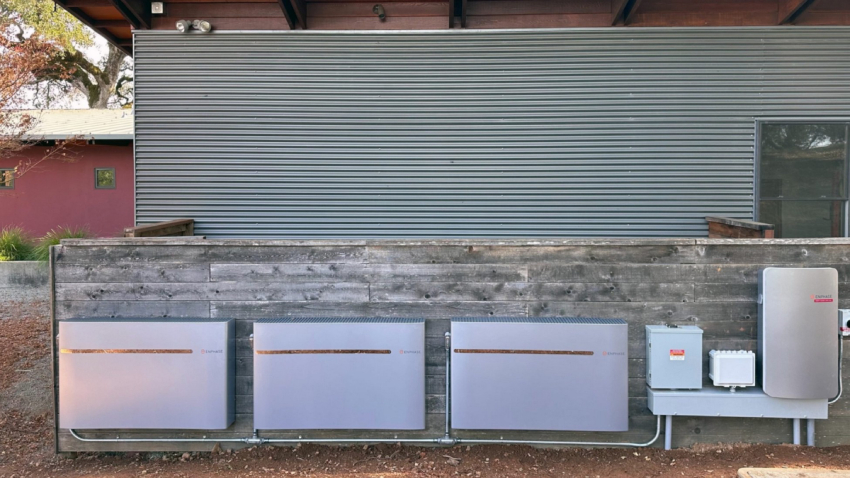
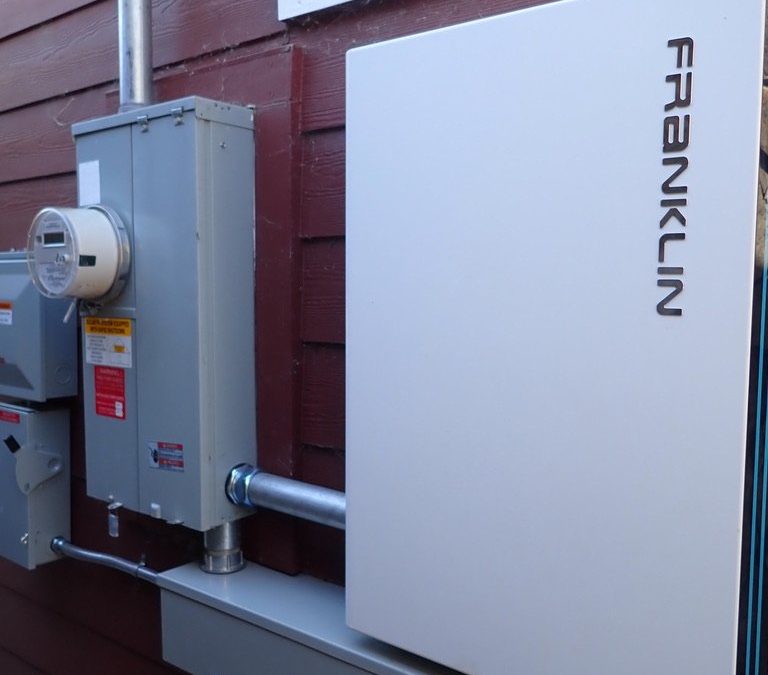
A large home backup battery installed on the exterior wall of a home.

A lot of homeowners start with the same question: if solar panels are going on the roof, does a battery need to come with them?

The honest answer is no, not always. But in most cases for new installations, a battery ends up being a necessary part of the whole setup.

Solar panels make power during the day. A battery gives that extra power somewhere to go. Instead of sending all of it away or only using solar when the sun is out, the home can hold onto some of that energy and use it later. That is the big reason solar battery installation keeps coming up in so many conversations.

For some households, a battery is mostly about backup power. For others, it is about getting more value out of solar. For a lot of people, it is both.

Why Are So Many People Asking About Solar Batteries?

Because the question has shifted.

A few years ago, most homeowners were mainly asking how many solar panels they needed and how much money solar might save. Those questions still matter. But now a lot more people are also asking what happens at night, what happens when the grid goes down, and how to rely less on the utility company.

That is where batteries come in.

A battery makes solar feel more flexible. It lets the home use stored solar energy after sunset, reducing how much energy you need to purchase from the utility. It can also help during blackouts or planned shutoffs. In places where outages are a real concern, that changes the conversation fast.

Does Every Solar System Need a Battery?

In most cases under the current Net Billing Tariff agreement with the utility, a battery is needed to maximize bill offset, lowering utility costs. Now that the utility does not credit you well to export your excess solar to the grid, a battery helps a lot with the return on your investment.

Not every household needs backup power but a battery becomes much easier to justify when the homeowner wants more than basic daytime solar production. If the goal includes backup power, more energy independence, or better use of solar after dark, then a battery starts looking a lot less optional.

So the better question is “What does this home need solar to do?”

What is The Difference Between a Savings Battery and a Backup Battery?

This is one of the most important parts of any solar battery installation conversation.

A savings battery is mostly there to store extra solar power and use it later, usually when electricity from the grid costs more or when the sun is down. The savings battery will not provide backup power when the grid is down.

A backup battery can function as a savings battery but is also about resilience. It is designed to keep important parts of the house running during an outage. That might mean the refrigerator, a well pump for water, some lights, internet equipment, garage access, or a few outlets.

Some homeowners want both better day-to-day energy use and peace of mind when the power goes out.

Will One Battery Run the Whole House?

Sometimes, but not automatically.

This is where expectations matter a lot. A battery can absolutely keep parts of a home running, but whole-home backup depends on how much electricity the house uses and how much battery storage is installed.

A smaller setup may cover the essentials. A larger setup may support much more. Big loads like central air conditioning, electric heating, dryers, ovens, or pool equipment can burn through stored energy fast.

That is why installers usually talk about “must have” loads first. It is a much more useful conversation. Instead of trying to power everything, many homeowners choose to keep the most important things on and keep the system realistic.

Can a Battery Be Added Later?

Yes, a battery can be added to an existing solar system.

Let’s face it, things change. Synergy is always available to assist with your changing energy needs.

Some homeowners install solar panels first and wait on storage. Then, later on, the priorities change. Maybe outage concerns go up. Maybe utility rates change.

So while adding storage later can work well, it is still something that should be looked at carefully rather than treated like a quick add-on.

What Does the Installation Process Actually Involve?

Usually more than people expect.

A proper solar battery installation is not just hanging a battery on the wall and calling it done. There is usually a site visit, system design, electrical review, system design, permitting, installation, inspection, and final testing.

Placement matters too. The battery has to go in a spot that works for safety, code, access, and future service. Synergy will also explain how the system works and how monitoring works, because batteries are not something homeowners should be left guessing about.

Is Getting a Home Backup Battery Worth It?

For a lot of homeowners, yes.

If the goal is more control, better backup, and a solar system that keeps working harder after the sun goes down, a battery can be a very smart move. That is why a professional assessment matters. The best answer depends on the home, the electrical setup, the agreement with the utility and what the homeowner actually wants from solar.

Find Out If a Battery Makes Sense for the Home

Homeowners who are thinking about solar battery installation do not need a one-size-fits-all answer. Synergy Solar can help evaluate the home, the current electrical setup, and the household’s energy goals to figure out whether battery storage is the right move now, later, or not at all.

Reach out to our professional team today!

📞 Call Synergy Solar: (707) 244-7300

🌐 Contact Us Online

How Much Does a Residential Solar Installation Usually Cost?

Rooftop Solar Panels Installation

In general, getting roof mounted solar panels without batteries costs anywhere from $10,000 to $25,000 before incentives in California. But the number you pay will depend on the home, the roof, and the household’s energy needs. That wide range can feel frustrating, but it also reflects something important: solar pricing is not one-size-fits-all.

For homeowners trying to budget on their residential solar installation, the best approach is to understand the main cost drivers first. Once those pieces are clear, the estimate starts to make a lot more sense.

Solar Installation Costs: At-A-Glance

For many homes, a residential solar installation costs:

  • Around $15,000 to $25,000 before incentives for a typical solar-only setup
  • More if battery storage is added
  • More if the roof is complex or electrical upgrades are needed
  • More for a ground mounted system or if trenching is needed
  • Less or more depending on system size and equipment choices

The final price should always be based on a site-specific assessment, not just an online calculator.

What Affects the Cost of a Solar Installation?

Several factors can move the cost up or down. Some are obvious, and others are easy to miss until the design process starts.

1. System Size

In simple terms:

  • Higher energy use usually means a larger system
  • Larger systems usually cost more overall
  • Larger systems may still offer better long-term value if they offset more utility costs

2. Roof Condition and Layout

The roof has a big impact on both design and labor. A simple roof with good sun exposure is easier to work with than one with multiple angles, dormers, vents, or heavy shading.

Roof-related cost factors often include:

  • Roof age and condition
  • Available space
  • Shading from trees or nearby structures
  • Roof pitch and complexity

Ground Mounted System Variables

  • Soil Conditions (rocky or softer)
  • Is any grading work needed
  • Layout of panels, all one array or broken into more than one
  • Distance of trenching and running wire

3. Equipment Choices

Not every solar system uses the same equipment. Panel type, inverter setup, monitoring tools, and battery storage can all change the price.

Common equipment decisions include:

  • Standard vs. premium solar panels
  • String inverter vs. microinverters
  • Solar-only vs. solar plus battery storage
  • A battery designed only to help offset bill cost or one to also provide back up power.
  • Basic system monitoring vs. more detailed module (panel) level monitoring

Battery storage adds major value and is needed to save money in most cases under the current agreement with most utility companies, but it also increases the upfront project cost. Synergy’s top-notch team will lay out recommendations for these choices

4. Electrical Work and Permitting

This is one of the most overlooked parts of solar pricing. Some homes need little extra work, while others need upgrades before installation can move forward.

Possible added costs can come from:

  • Main panel upgrades
  • Additional sub/backup panels
  • Wiring improvements
  • Added work such as the installation of an EV charger
  • Permitting and inspections
  • Utility interconnection requirements

These are often unexpected but real parts of building a safe, code-compliant system for your home.

A Fictional Case Study Example

Important note: This case study is meant to show how solar pricing can work in a realistic example. It is not a real customer project and not a quote.

Consider a homeowner in Sonoma County with the following conditions:

  • A 1,900-square-foot home
  • Annual electric usage of about 9,000 kWh
  • A roof in good condition
  • Good sun exposure with only light afternoon shading
  • No immediate need for a main panel upgrade
  • Interest in solar only, without battery storage for now

In this example, a system around 7 to 8 kW might be a reasonable fit.

Estimated Example Pricing

For this scenario, the homeowner might see something like:

  • Solar panels and core equipment: $14,000 to $18,000
  • Design, permitting, utility interconnection application and installation labor: $8,000 to $11,000
  • Monitoring and project setup: included or modestly priced depending on equipment
  • Estimated total before incentives: $22,000 to $29,000

These prices are subject to change under different conditions. For example, if this homeowner decides to add a battery, or if their home also needed electrical upgrades, the project cost could rise significantly. 

What Should Be Included in a Solar Quote?

A useful solar quote should do more than show one final number. It should explain what the homeowner is actually paying for.

A solid quote should clearly cover:

  • Recommended system size
  • Estimated energy production
  • Estimated savings
  • Location of system
  • Panel and inverter type
  • Whether battery storage is included and if it is designed to provide backup power in addition to bill savings
  • Roof or shading considerations
  • Any needed electrical upgrades
  • Permitting and inspection steps
  • Warranty and monitoring details
  • Recommended options or add-ons that the home owner might not know they need

The clearer the quote, the easier it is to compare options and avoid confusion later.

How Homeowners Can Budget More Accurately

Homeowners do not need to know every technical detail before starting. It is Synergy’s job to be available to answer any questions and we take that very seriously. But here are a few practical steps the home owner can do to make the process easier.

Helpful ways to prepare

  • Review the last 12 months of electric bills
  • Think about future energy needs, such as EV charging
  • Consider the roof’s age and condition
  • Decide whether backup power is important
  • Ask for a site-specific proposal instead of a rough online estimate
  • Read the Solar Consumer Protection Guide
  • Know that every solar contract (except new construction) is required to include a Solar Energy System Supporting Information document which describes costs and benefits

This helps turn a vague price range into a more realistic budget.

FAQ

Does adding a battery make solar much more expensive?

Yes. Battery storage can add significant cost, but it may also help homeowners get more value from stored energy and/or provide backup power.

Is a bigger solar system always better?

Not always. The best system size depends on energy usage, budget, available roof space, and future plans for the home.

Can online calculators give an exact price?

No. They can provide a rough starting point, but a true quote should be based on the property, roof, electrical setup, and household energy needs.

Is a warranty important?

Yes, while you may never need it, comparing the labor warranty coverage from the installer has value. Product warranties, generally speaking, are similar. Understand if the installer will warranty labor for replacing failed products, not just for workmanship issues.

Ready for a Clearer Solar Estimate?

Your home’s solar installation final costs depend on variables ranging from home energy use to equipment choices. Getting a realistic number means getting help from a company that comes out to your site for an assessment. 

If you’re ready to move from a rough estimate to a clear plan for your residential solar installation, Synergy Solar provides a tailored evaluation and quote based on your property, goals, and long-term energy needs.

Reach out to our professional team today!

📞 Call Synergy Solar: (707) 244-7300

🌐 Contact Us Online


Exciting News!! NEW ways to expand your solar system WITHOUT affecting your Net Energy Metering (NEM)

Exciting News!! NEW ways to expand your solar system WITHOUT affecting your Net Energy Metering (NEM)

New Options for Adding Non-Export Solar to an Existing NEM System

The California Public Utilities Commission and the three major Investor-Owned Utilities recently approved new ways to add a “Non-Export” system to an existing NEM system. PG&E, Southern California Edison, and San Diego Gas & Electric now allow several methods that keep your current NEM status intact when adding new solar capacity. These changes create more flexibility for homeowners who want to increase on-site solar use without sending power to the grid.

Why System Expansion Usually Ends NEM

If you expand a NEM system by 10 percent or 1 kW, you lose your original NEM status. Utilities created this limit to allow simple maintenance, not system growth. Your NEM program determines how the utility credits your exported solar. Older NEM versions credit far better than newer ones. Your NEM agreement lasts 20 years from the date you received Permission to Operate. The newest tariff, called NBT, offers much lower export credits.

When Losing NEM Might Still Make Sense

In some situations, expanding your system and losing NEM may still help. You might benefit if your current system leaves you with high true-up bills and/or plan to increase electric usage. Many people add EVs or switch from gas to electric appliances. These changes can quickly outgrow your system’s original size. A detailed analysis helps determine whether expansion under NBT is worthwhile.

Adding a Non-Export System as an Alternative

You can also add a “Non-Export” system, which protects your existing NEM status. Utilities now allow several ways to meet non-export rules. Two methods use a Power Control System that manages power flow through software. Another method uses a separate utility meter called a Net Generation Output Meter, or NGOM. These options keep new solar from exporting to the grid.

Why Pairing Non-Export Solar With Storage Helps

Most homeowners gain more value by pairing a non-export system with energy storage. Batteries store excess solar instead of sending it to the grid. Storage also boosts resilience and reduces exposure to rising utility rates. Designing these systems requires careful analysis to maximize performance.

Adding Storage Alone Will Not Affect NEM

Adding only an energy storage system does not change your existing NEM status. You can install storage to gain backup power or extra savings without risking your current agreement.

Batteries on Wall

Drone Photo of Solar Panels on roof